Changes to Library Opening Hours

From 15 September 2025 changes will be made to the opening hours of some of our libraries, these changes are set out below.  Please check the library opening hours webpage for full details of all library opening hours.  

  • Semester opening times of four site libraries – Law, ECA, Moray House, Noreen and Kenneth Murray – will be: Monday to Thursday 9am-8pm; Friday 9am-5pm (9am-7pm for Law and Noreen and Kenneth Murray) 
  • New College Library will close at 5pm Monday-Friday 
  • Weekend opening hours of the following libraries – Law, ECA, Moray House, Noreen and Kenneth Murray and New College – will be standardised to 12pm-5pm. 
  • Art & Architecture Library will close for University vacation periods. 

Changes at the Western General Hospital Library 

The Western General Hospital Library will convert to a self-service Student Study Area from 1 September. The EdHelp service desk and Library will close at 5pm on Friday 22 August, and the small book collection will be moved in the week of 25 August. 

Changes at the Main Library 

From 1 September, the EdHelp service desk in the Main Library will close at 7pm weekdays and 5pm weekends. This does not affect the opening hours of the Main Library itself, which remains open 24×7. 

Feedback

These changes are being made based on analysis of library and service usage and will allow us to provide a more effective service. Comments and feedback from users (both staff and student) can be directed through the normal channel at Information Services Feedback Form | Help | Information Services

Getting a jump-start on Resource Lists!

If you’re an academic working in the School of Law, you may have seen several emails flying back and forth about Resource Lists and getting them created for new courses, or updating those for courses due to run in the next academic year. You may be curious about what all the fuss is about and whether they even actually help our students find the things they need. If you’re a Course Organiser we’d love to encourage you to set up a list, if you haven’t already, and make it as helpful as possible for the incoming cohort. We’re keen to bust some myths which might be putting people off so let’s look at some common concerns below.


I’m too busy, I really don’t have time to make up a list or learn how Leganto works!

We appreciate the huge time pressure that our academic colleagues face, but it doesn’t mean you need to duplicate work or construct a list from scratch. Here are some ways we can help:

  • If the Course Organiser already has their reading list in a word document and can indicate priority on this (Essential/Recommended/Further Reading) then this can be sent to the Library via the online form and they will create the list.
  • If the materials which make up the reading list are contained in the Course Guide, or one or more other documents, handouts or presentations, we Law Librarians  will be happy to help collate these into a Resource List and work with COs to finalise the list.
  • If the Course Organiser has the time and wishes to, they can create the list themselves. Full guidance is available on the library website.

I’ve missed the deadline, is there any point in still submitting a list? 

Yes absolutely. The deadlines the Library sets for submission or review of Resource Lists is deliberately early so that they can guarantee to have lists and purchases ready for the start of teaching. However, missing the deadline should not be a reason not to create or review a list at all. Lists can be submitted at any time and the Library will do their best to get them ready as quickly as they possibly can. Lists submitted after the deadline will be dealt with first come, first served so there is a benefit to getting them in as early as possible! Where possible, Course Organisers are strongly encouraged to send their lists to the Library by the stated deadlines.

But I don’t know everything I’ll need right now. Some of my guest tutors may have things to add later. 

Lists are not set in stone once submitted to the library. Course Organisers can add to and amend the list at any time, even during teaching if necessary, but getting the bulk of your list organised now means it’s more likely to be ready before your students need it.

I am concerned that this is ‘spoonfeeding’ our students. If they get links to every resource they need, they won’t investigate on their own. 

There is no expectation that every possible resource related to the course topic will be included in the list. The Essential readings must be included, but the Course Organiser can choose to include Recommended and Further Readings as appropriate (with the caveat, of course, that items not included on lists can’t be taken into account in the Library’s planning for purchases and digital subscriptions, so they wouldn’t be able to guarantee availability).

Resource Lists foster student library skills, by keeping them within the Library ecosystem of tools and services rather than in Google Scholar or ChatGPT. Furthermore, the Library offers their LibSmart online course to help build these skills.

Use of a Resource List does not de-skill our students, or hinder the development of research skills. If one of the key tasks on a course is for students to research and discover materials by themselves, then of course those materials need not be included on the course Resource List. The key accessibility need is to remove barriers to students finding and engaging with their essential readings – the ones they cannot do without – and allowing them to plan their time accordingly (they are also under, at times, extreme pressure). Student feedback on Resource Lists demonstrates how much the system helps with this and how valuable our students find it.

I’ve never had a Resource List before and I don’t want one now. My methods of teaching have always been fine in the past! 

Providing a Resource List does not force a Course Organiser to change the way they teach. It simply provides the students with their readings and other resources in the same place and in a consistent way across all their courses, whichever School they might be in. In fact, use of the Resource List system frees up staff time, as they no longer need to provide and maintain their own lists of references and links – they can simply refer the students to the Resource List atthe appropriate places and have the Library review the list each year to keep it current.

Hmm, I’ll think about it, but I do have more questions.

Great, no problem. We have actually created a guidance document specifically for the School of Law which goes into more depth on what you may or may not wish to include on your list: Law Resource List guidance v3

You could have a look at that first, and if you still have questions just let us know. We’re happy to discuss resource lists via email at any time. You can also contact the Library Learning Services team (who run the Resource List service) directly for assistance with creating and editing lists.


We hope this has been convincing. We love Resource Lists here at the library because they help us keep our fingers on the pulse of what’s being used to teach. It helps us keep the Law Library stocked with the right texts for the right student numbers, which is of crucial importance to supporting our users in their study and research.

Watch this space for more on Resource Lists as we launch into the new academic year, where we’ll be posting up recommended user guides for students as well as stats on the top used Resource Lists for the school.


This post was created using material written by Neil Davidson, Learning Technologist for the School of Law. Neil is an expert in the creation and use of Resource Lists and can be contacted via email. 

Library Databases search box now live!

So, how have you been searching for databases for your studies so far?

Have you been using the link from myEd?

Or perhaps going straight to the Databases A-Z list or by subject?

Well, now there is another way that is user friendly and hopefully can increase your engagement with using databases. A Library Databases search went live a few weeks ago. Its aim is to improve the way you search for databases; you can either search by name (if you already know the name of the database you want to access) or by subject. Using either way, will limit the results in DiscoverEd to the ones that are most relevant.Library Database search bar

Here are two examples:

a) if you want to search for Westlaw, you type the name of the database and click on the search button. As soon as you do that, you will be directed to the Westlaw link in DiscoverEd                                                            Library Database search displaying the result for Westlaw

b) if you don’t know which database you want to access but instead search by subject, then you will get a list of databases that are relevant to the subject term you inserted. In this example, I used ‘law’.                                      Library Database search displaying the results for law

In both cases, please remember to sign in before you go any further so that you can access all the material we are subscribed to.

The usage of this new featured will be monitored over the next few months (in comparison to the Databases A-Z for example) and if you find it useful, any feedback will be welcomed.

Till then, happy searching and be in touch with any comments!

Dissertation prep: resources for writing dissertations

Did you know the library has a list of resources that can help you get started with big research projects such as dissertations? You may feel a bit overwhelmed about how to begin, but the library team have helpfully compiled a Resource List of books, guidance and articles that we think will ensure you feel more confident:

Law Dissertation (UG) 

Law Dissertation (PG)

Resource Lists are clickable pages of bookmarks that link directly to items in our library catalogue, many of which you can access online. Most courses will have prescribed Resource Lists that indicate the reading for your modules, and students tell us they find them helpful and easy to use. PG Students will also find this list linked in the Learn pages for PG dissertation students.

If this is your first time conducting a large research project, you may find the session we run each semester for PhD students in Law to be of interest. You can watch a recording of this session on our Media Hopper channel here:

Screengrab of first slide of Sources, Materials and Bibliographies recording.

Finally if you’re struggling to get to grips with literature searching then you can arrange a one-to-one appointment with us, your Law Librarian team. Visit the MyEd Events Booking system and look for ‘literature search clinic’ and select the option relating to Law. We offer appointments most weeks, and if you can’t see a bookable slot that suits you please email us on law.librarian@ed.ac.uk.

Welcome to Week One!

Hello, and if you’re a new student joining us for the 2023/24 academic year we look forward to meeting you in the Law Library soon!

We are Anna Richards and SarahLouise McDonald, and we are your Law Librarians. Anna works the first half of the week, SarahLouise the second, and you can reach us both by email on law.librarian@ed.ac.uk at any time.

Photos of Anna and SarahLouise (L-R). The background is formed of a white space with black and blue geometric shapes behind the photos.

You may have already met us at one of the several induction sessions we’ve been running over the past week or two. If you missed them you can find recordings on the Law Librarian Media Hopper Channel:

The slides for each session are added as ‘attachments’ to the videos above. Please note that captions are automatically generated and we’ll endeavour to get them corrected over the coming month.

One session which wasn’t recorded was the Diploma Welcome to the Library session which was delivered face-to-face. If you’re a Diploma student you should already have access to the slides via your Learn pages, but if not you can find them here: Law – Diploma induction 2023.

If you’re looking for information on using the physical library, we recommend you check out the Law Library webpages and take a look at our Virtual Orientation Guide (Microsoft Sway document – other formats are available by request). We hope that you’ll get in touch with either ourselves or our colleagues on the library helpdesk by contacting EdHelp if you have any queries. See you in the library!

New resource: Decolonisation and Legal Knowledge

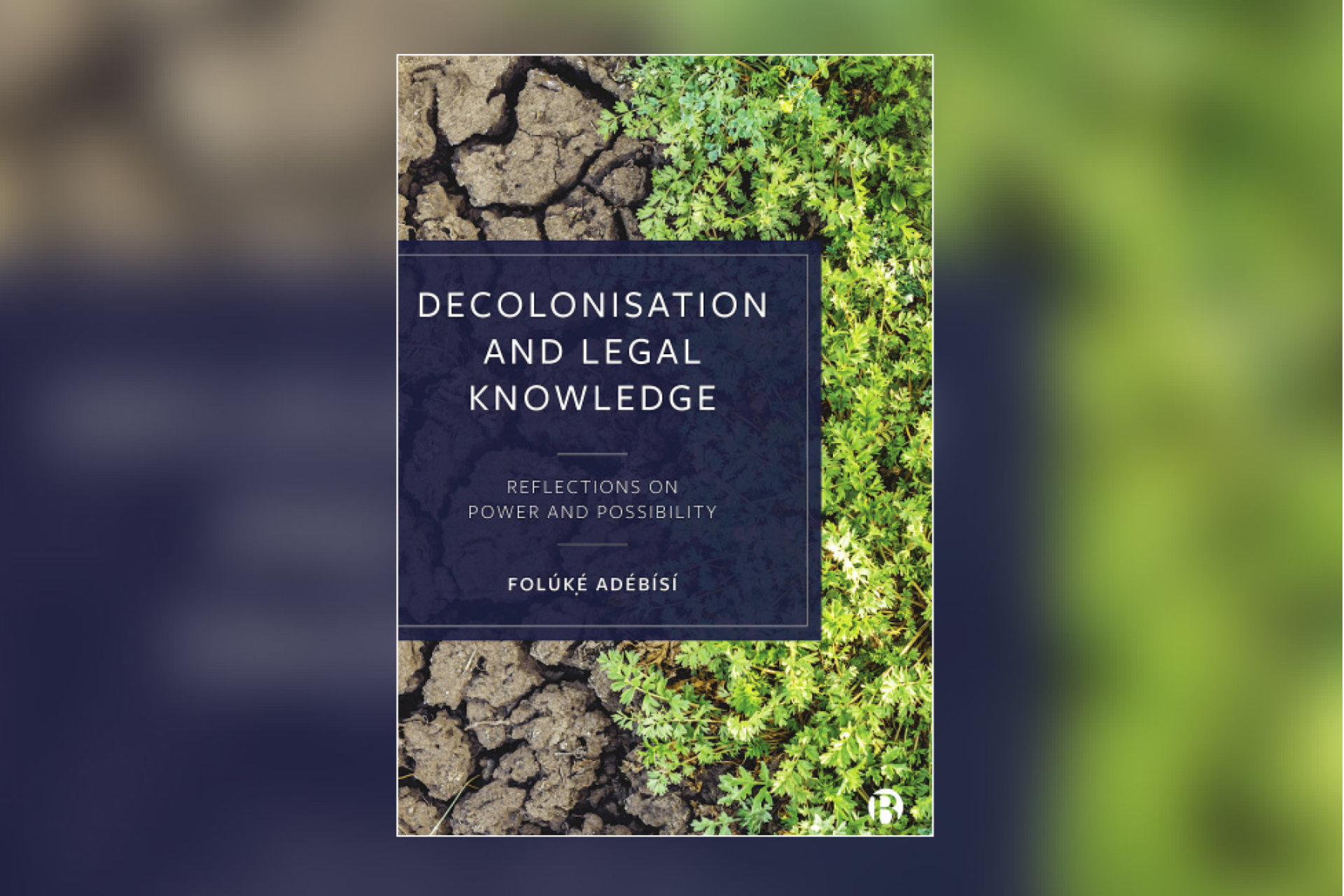
In January the School of Law was fortunate to host the book launch event for Professor Folúkẹ́ Adébísí’s Decolonisation and Legal Knowledge: Reflections on Power and Possibility. 

Cover image of the book Decolonisation and Legal Knowledge. The book title and author information is located in a blue box on the centre-left of the cover. Behind is an image of cracked earth meeting green branches and foliage which are growing from the right edge of the cover.

From the publisher:

The law is heavily implicated in creating, maintaining, and reproducing racialised hierarchies which bring about and preserve acute global disparities and injustices. This essential book provides an examination of the meanings of decolonisation and explores how this examination can inform teaching, researching, and practising of law.

It explores the ways in which the foundations of law are entangled in colonial thought and in its [re]production of ideas of commodification of bodies and space-time. Thus, it is an exploration of the ways in which we can use theories and praxes of decolonisation to produce legal knowledge for flourishing futures.

This text is now available via DiscoverEd: Decolonisation and Legal Knowledge: Reflections on Power and Possibility.

If you’re interested in requesting material like this that you think would be a valuable addition to the Law Library, you can complete the Request A Book (RAB) form. Alternatively if you’re interested in the library securing access to subscriptions or expensive items that you think would benefit teaching or research, contact us by email (law.librarian@ed.ac.uk) to discuss your idea!

Bloomsbury Professional Ebooks: formerly on LexisLibrary

We want to alert students to a change we’re dealing with regarding Bloomsbury Professional ebooks which were formerly offered on the LexisLibrary platform.. Unfortunately going forward these will no longer be available on this database, and we’re working on access to them via Bloomsbury’s own platform instead.

The courses affected are mainly Property, Evidence, Criminal, Employment, and Contract Law, and the book titles are as follows:

  • Walker & Walker: The Law of Evidence in Scotland
  • A fingertip guide to Scots Criminal law
  •  Commercial Leases
  • McDonald’s Conveyancing Manual
  • Conveyancing Practice in Scotland
  • Property Trusts and Succession
  • Mental Health, Incapacity and the Law in Scotland
  • Scottish Law of Leases
  • Scots Criminal Law
  • Employment Law in Scotland
  • Contract Law in Scotland
  • Missives
  • Scottish Planning Law
  • Scottish Older Client Law Service
  • Drafting Wills in Scotland
  • International Sucession Laws
  • Thomson’s Delictual Liability
  • Tolley’s Estate Planning
  • Tolley’s Inheritance Tax
  • Tolley’s Company Law Handbook
  • Style Writs in the Sheriff Court

While negotiations are ongoing with Bloomsbury (and until the end of May 2023) we’ll be able to access all of these titles using a trial they’ve given us to their own platform, providing students from 2022/23 access through the end of Semester Two exams. The procedure for finding these books is as follows:

  1. Visit the EResources Trials page
  2. Click on ‘Bloomsbury Professional Scots Law Titles’
  3. You will be prompted to log in with your usual username and password.
  4. You’ll arrive at a page that will give you the username and password to use on the Bloomsbury site
  5. Click the link to Bloomsbury (it helps to do this in a new tab or window so you can copy the log in details), then enter the username and password to log in.
  6. Use the navigation on the left hand side to access the title of the book you need.

This information has been added to the DiscoverEd records for these books, and I will also be circulating it via newsletters, blogs and other communication channels. Please do share this information with your classmates to assist them with their study or research if they require access to these books.

If you have any issues accessing these items please email us on law.librarian@ed.ac.uk.

Finding key resources: Stair Memorial Encyclopaedia

For those rejoining us in January for Semester Two, welcome back! For those who are new to the Law School or just this blog, welcome! This is where we report news, updates and offer tips for training in library resources. The blog is currently written by SarahLouise, the Law Librarian who works Wednesdays to Fridays, as we have a vacancy for the other half of the post. We hope to have a new Law Librarian joining the team over the next few months and will introduce them when they start!

We’ve received quite a few queries about locating some key resources for research and study over the last few months so we wanted to clarify how best to access these. First up, the Stair Memorial Encyclopaedia. This is a resource which is core for our undergraduate students as they get to grips with Scots Law. We do have instructions listed on the Law Databases Help & Training page under ‘Resources for Scottish Legal System’, but we wanted to add some screenshots here for the visual learners.

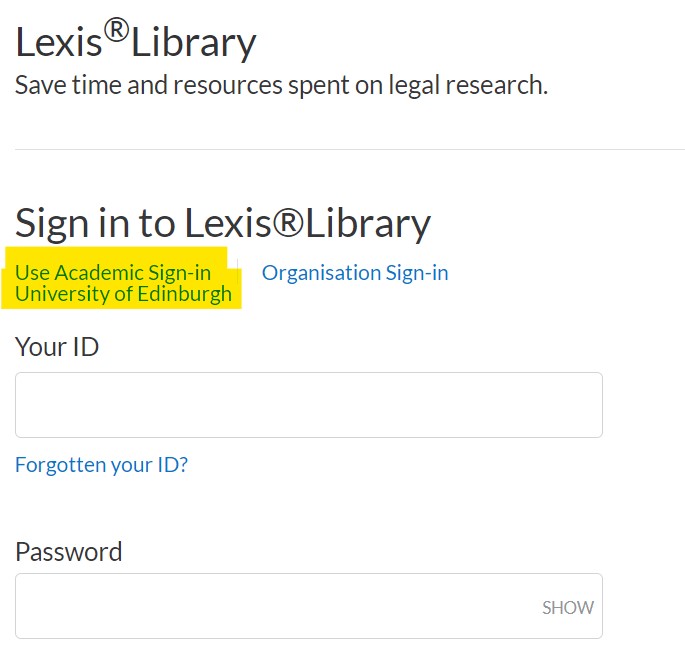
  • To log in to Lexis+, you will need to select ‘academic log in’. You may then be presented with a dropdown box to select ‘UK Access Federation’. Select ‘University of Edinburgh’ from the list, and you will be logged in. Alternatively you may have the option to select ‘University of Edinburgh from the front page – do this if available!

Screengrab of login page for LexisLibrary/Lexis+. The words 'use academic sign in' and 'university of edinburgh' have been highlighted in yellow to indicate areas to click on.

  • You may be asked to log in with your UUN at this stage if you’re not on-campus. Use your usual student ID and password.
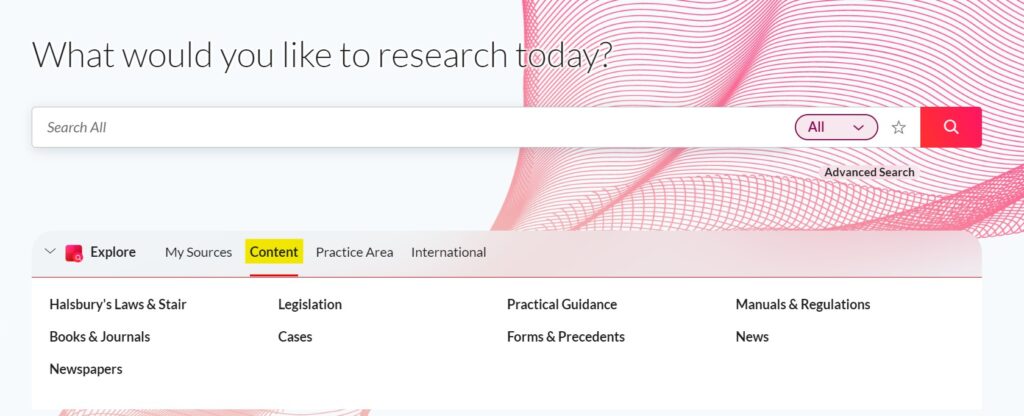
  • In the middle panel in the centre of the page, select ‘content’ from the navigation menu.

Screengrab of main panel when logged in to Lexis+. In the central pane there are a number of links across a navigational bar, and in this image the link to 'content' is highlighted in yellow.

  • The resource will be one of the first items listed as ‘Halsburys Laws and Stair’. Click this.
  • Then you will see a link to Stair Memorial Encyclopaedia. Click the title, and use the plus and minus boxes to navigate through to find the section you need.
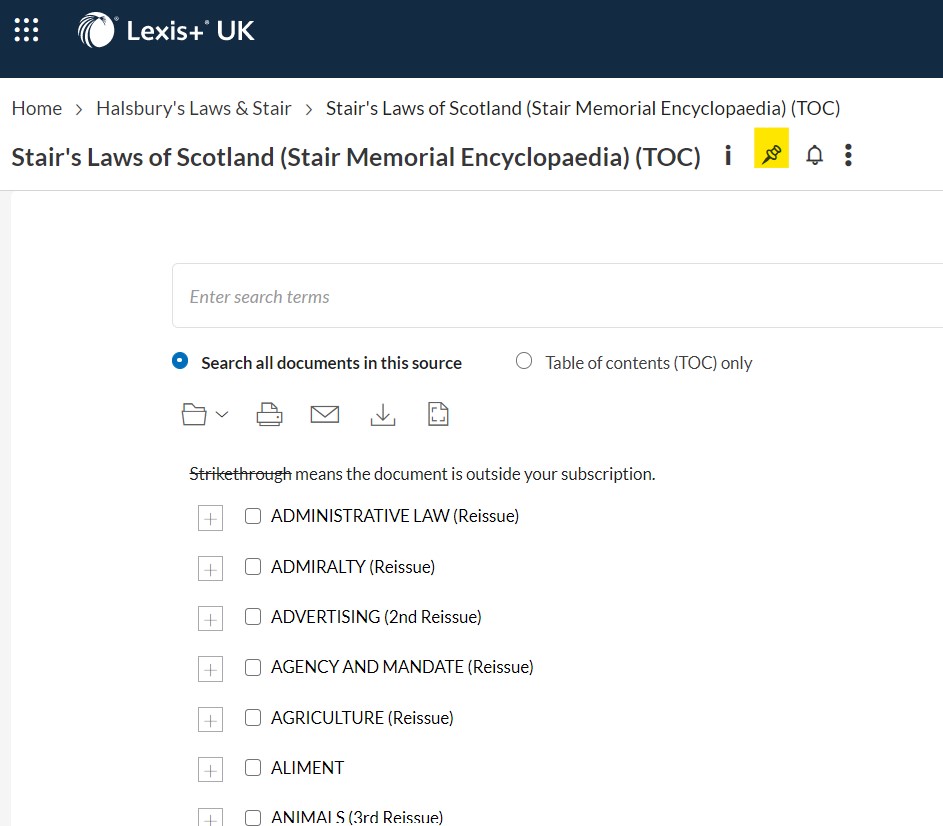
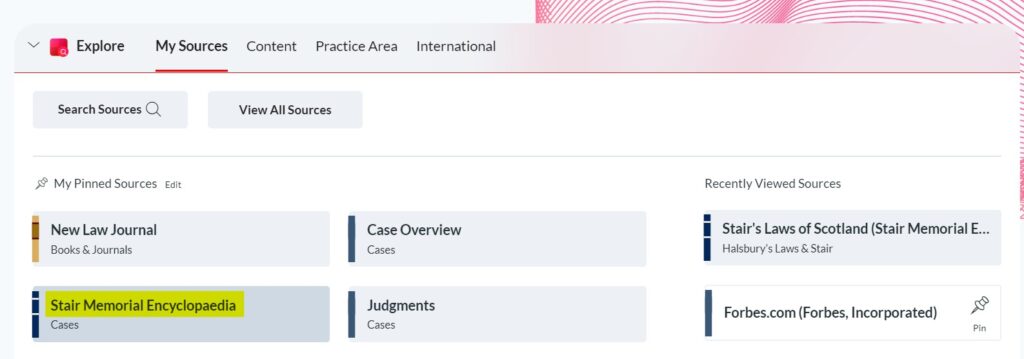
  • If you want to, use the pushpin icon near the title to add this to your pinned sources. This bookmarking tool means that a shortcut will appear under ‘My Sources’ on the main panel when you log in to Lexis in future, which will save you a few steps.

Screengrab of the contents page of the Stair ebook is shown. There is a pushpin icon in the top right of the image which has been highlighted in yellow.

Screengrab of main panel of Lexis+ again, this time with 'My Sources' selected. Below the navigational bar the direct link to the Stair Memorial Encyclopaedia is highlighted in yellow.

We hope this is helpful. If you have a resource you’d like a little more advice on accessing, please let us know by email (law.librarian@ed.ac.uk) or by commenting on this post.

Warm wishes from your Law Librarian

Working in the Law Library today has been like night and day since the study space scramble of last week, and that’s because most students have now finished up for the term and are beginning their winter breaks. The Law Library is still open until 4.50pm tomorrow (Thursday 22nd December), and we will then close our doors until Wednesday 4th January 2022. If you are studying or conducting research over the winter break you will find our online resources remain accessible via the usual channels, but should you run into difficulties we will not be able to respond to any messages until we return in January. Alternatively the Main Library is available during the holidays, you can find out more on their page on the website.

It’s been a bit of a tricky year in the land of Law Libraries as we’ve been short staffed for much of Semester One both on the Helpdesk and in the Academic Support Librarian team. We appreciate your patience while we do what we can in the time available, and look forward to Semester Two where we hope we’ll be back up to a full complement before too long.

We wish you a pleasant and restful winter break and hope for your health and happiness during your time away from the University. See you next Semester!

 – SarahLouise 

Christmas tree on display in the quad at Old College.


Meet your LexisNexis Student Associate for 2022/23!

You may have seen that we’ve featured LexisNexis quite a lot on the blog this semester, due to the launch of their new platform, Lexis+. We’ve provided a fair bit of information about how to access items and how to get further training, but one person we have yet to mention is your Student Associate, Olivia Riddell. Lexis employ Olivia to provide peer support for students at the University of Edinburgh who want to work with Lexis and use it for their studies or research. We had a quick word with her to ask her more about what her role entails:


Tell us a little bit about yourself! Who are you and what do you study at Edinburgh?Photo of Olivia, a person with long blonde hair who is smiling at the camera. Photo is shown in round frame.

My name is Olivia, and I am a fourth-year law student at Edinburgh. I am from the North of England but wanted to study at Edinburgh as a bid to broaden my horizons. It has been nice to experience the quieter life and scenery that Scotland offers before accessing work opportunities in the City.

Why did you apply to be the student representative for LexisNexis?

I wanted to have experience related to law. My previous experience working in retail taught me soft skills and resilience, but this role has truly developed other areas needed in a professional capacity such as marketing strategies, proactiveness and negotiations. This is especially necessary if students want to harness their skills in preparation for a role requiring good capacity of leadership and business relations. It also challenges me personally. For example, it has improved my confidence (in reaching out to students, and teaching sessions) and stretched my ability to form professional networks with students in the law school, and with faculty staff.

What do you think is the best feature that Lexis offers for students in the Law School?

The ability to type in key words and find related journal articles and added references for essays. It enables you to find related sources that have an affinity with your argument or essay title meaning your assignment will be much stronger based on accuracy and relevancy.

When students book a training session with you, what can they expect to get from the meeting?

There are different types of sessions. I will be organising certification sessions (Foundation and Advanced) which will enhance your professional profile and experience. These downloadable and professional certificates will make you stand out, and you can showcase these on LinkedIn. In addition, I will be running assignment training in December 2022 and Easter 2023 to ensure you know how to use LexisNexis to help in your upcoming assignments. In semester two, I will also be conducting commercial awareness sessions in 2023 to help with future internship and vacation scheme placement applications, and how you can access such material on the LexisNexis site.


You can reach Olivia by email with any queries or training requests: s1925406@ed.ac.uk

If you need help with any other databases or would like to discuss other available training please let the law librarian team know by email: law.librarian@ed.ac.uk.